fMRIPrep
This page provides information on running the fMRIPrep pipeline via XNAT. We will explain what fMRIPrep does, show you what you need to run fMRIPrep and the exact steps to launch it, and help you understand some of the key fMRIPrep outputs. We will also talk about important configuration options, common issues to watch for, and how to troubleshoot problems.
What is fMRIPrep?
fMRIPrep is a robust and automated preprocessing pipeline for functional MRI data. It performs:
Anatomical Processing: T1w/T2w image processing, brain extraction, and tissue segmentation
Functional Processing: Motion correction, slice timing correction, and distortion correction
Surface-Based Processing: FreeSurfer surface reconstruction and registration
Spatial Normalization: Registration to standard spaces (MNI152, fsaverage)
Confound Estimation: Comprehensive confound regression variables
Quality Control: Automated quality assessment and visual reports
For detailed information about fMRIPrep, visit the official documentation.
What You Need Before Running
Before running fMRIPrep, you need to run dcm2bids, which will convert the raw data to BIDS format and output in the rawdata directory under Resources.
The subject must also have a T1w anatomical image available in the same XNAT project. The T1w image does not need to be in the same scanning session as the functional data; the pipeline can automatically pull it from another session for the same subject, as long as that session is within the same project. If no T1w image is available in the project, fMRIPrep will not run.

Incorrect sbref and fieldmaps are some of the most common issues when running fMRIPrep. Please refer to the dcm2bids page for more details. If dcm2bids ran successfully, there’s nothing else you need to do.
How to Launch the Pipeline
Note
For step-by-step instructions on running any pipeline, see Running Pipelines on XNAT. To enable pipelines for your project, see Enabling Pipelines for Your Project. For running pipelines across multiple subjects in parallel, see Running Pipelines Across Multiple Subjects.
Navigate to your session on XNAT, click “Run Preprocessing Pipeline”, select “fMRIPrep” from the pipeline dropdown, and then configure the parameters below (see screenshot)
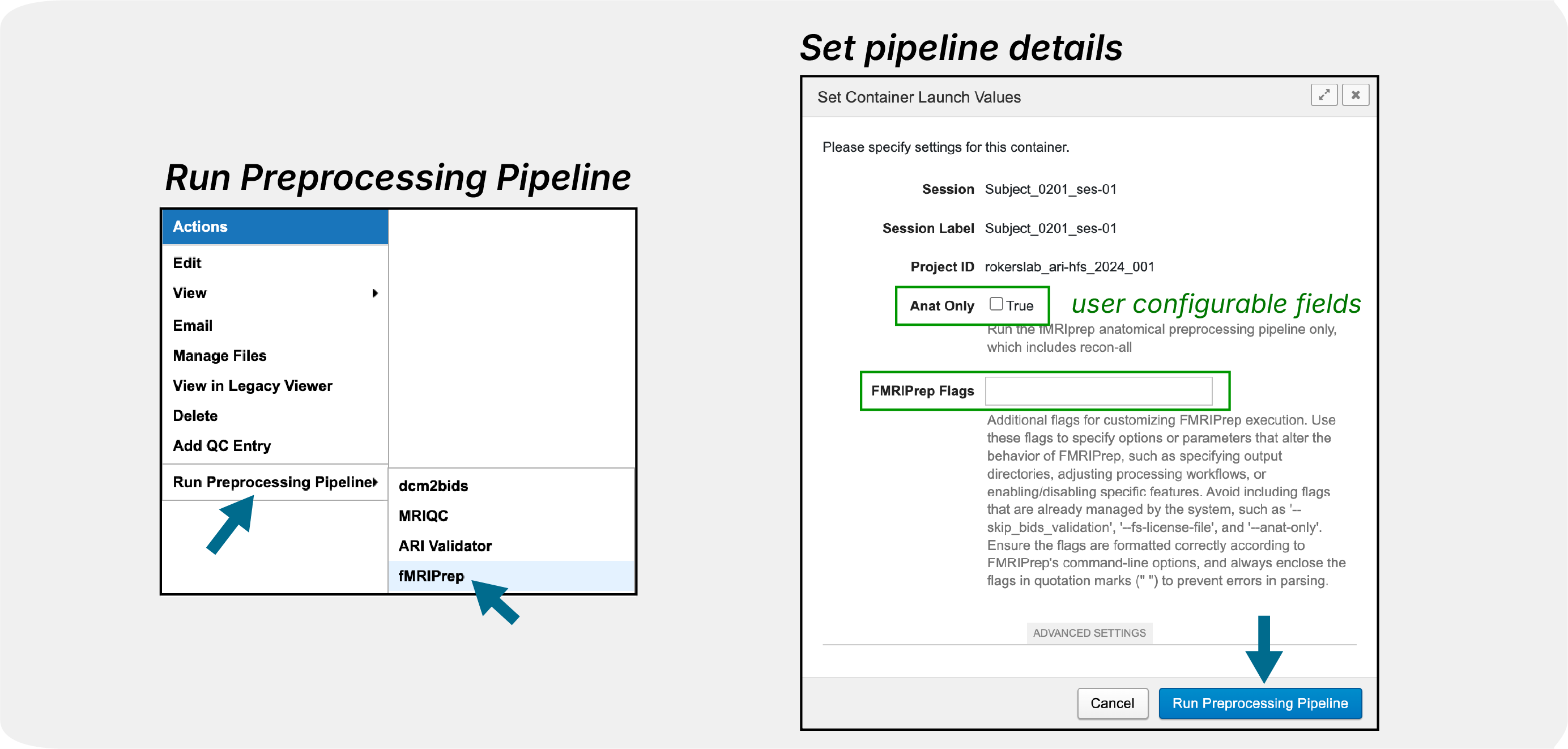
Anat Only: Checkbox to run anatomical preprocessing only (freesurfer recon-all)
FMRIPrep Flags: Text box for additional command-line options such as
--output-spaces MNI152NLin2009cAsym:res-2. For more information on the flags, see the fMRIPrep documentation. Default output space is set to T1w, fsaverage, and fsnative :--output-space T1w:res-native fsnative:den-41k fsaverage:den-41k. Read more about output spaces here.
Note
If a subject has multiple sessions, fMRIPrep can reuse the subject’s existing
FreeSurfer recon-all output. After fMRIPrep has completed successfully for
one session, running fMRIPrep on another session for the same subject will use
the existing FreeSurfer output instead of running recon-all again.
Important Things to Pay Attention To
During Processing:
Monitor job status through XNAT pipeline interface
Be patient - preprocessing can take 12+ hours
After Completion:
Review HTML reports for quality assessment
Verify output completeness - ensure all expected files are generated
Check for warnings in the processing logs
Common Issues to Watch For:
Surface reconstruction failures: Poor T1w quality can cause FreeSurfer errors
Registration issues: Check alignment in HTML reports
Missing fieldmaps: Distortion correction will not be applied
Memory errors: Large datasets may exceed memory limits (please contact us).
Output Structure
fMRIPrep generates outputs in BIDS derivatives format:
<Resources>/
fmriprep/
logs/
sub-9527/
figures/
logs/
ses-01/
anat/
...
sub-9527_ses-01_desc-preproc_T1w.nii.gz
fmap/
func/
...
sub-9527_ses-01_task-restingstate_run-01_space-T1w_desc-preproc_bold.nii.gz
sub-9527_ses-01_task-restingstate_run-01_hemi-L_space-fsnative_bold.func.gii
sub-9527_ses-01_task-restingstate_run-01_hemi-R_space-fsnative_bold.func.gii
sub-9527_ses-01_task-restingstate_run-01_hemi-L_space-fsaverage6_bold.func.gii
sub-9527_ses-01_task-restingstate_run-01_hemi-R_space-fsaverage6_bold.func.gii
sub-9527_ses-01_task-restingstate_run-01_desc-confounds_timeseries.tsv
dataset_description.json
desc-aparcaseg_dseg.tsv
desc-aseg_dseg.tsv
sub-9527.html
freesurfer/
fsaverage/
fsaverage6/
sub-9527/
ses-01/
label/
mri/
scripts/
stats/
...
aseg.stats
surf/
tmp/
touch/
Some of the example output files:
fmriprep/sub-<label>.html: Quality control report that you can use to check the quality of the preprocessing especially regarding motion correction, distortion correction, and registration between the functional and anatomical data. This is the first file you should check after the pipeline is complete.fmriprep/sub-<label>/func/*_desc-preproc_bold.nii.gz: Preprocessed functional data in T1w space, this is your actual data that you can use for your analysis in the volume space.fmriprep/sub-<label>/func/*_space-fsnative_bold.func.gii: Preprocessed functional data in fsnative space, this is the data that you can use for surface-based analysis.fmriprep/sub-<label>/func/*_space-fsaverage6_bold.func.gii: Preprocessed functional data in fsaverage6 space, this is also for surface-based analysis but it is in a template space.fmriprep/sub-<label>/func/*_desc-confounds_timeseries.tsv: Confound regression variables that you can use to regress out from your data, especially relevant for GLM.freesurfer/sub-<label>/ses-<label>/stats/aseg.stats: FreeSurfer segmentation statistics. We get a lot of requests to help parsing this file, as a result, we will be building a pipeline to automate the process of parsing this file and others, stay tuned!
For detailed output descriptions, see the fMRIPrep outputs documentation.
Troubleshooting
If fMRIPrep fails, check the output resource for logs and include them when contacting support. Common issues include invalid BIDS inputs, missing anatomical images, fieldmap problems, and FreeSurfer failures caused by poor T1w image quality.
Next Steps After Preprocessing
Use Download via Browser to access results
Enjoy!
Note
Currently, we are running fMRIPrep (v24.1.1) and FreeSurfer (v7.3.2). We are working on making more versions available. If you have an urgent request for a specific version, please contact us.