ari-validator
Note
For step-by-step instructions on running any pipeline, see Running Pipelines on XNAT. To enable pipelines for your project, see Enabling Pipelines for Your Project. For running pipelines across multiple subjects in parallel, see Running Pipelines Across Multiple Subjects.
The ari-validator pipeline validates ARI project datasets by checking BIDS and ARI-specific compliance, producing a detailed log file which can be used to track the status of your data.
Similar validation pipelines can be created for your projects if you have specific requirements for your scans and want to have a way to validate your data before spending time on preprocessing.
Validation Steps
Sbref Phase Encoding: Validates phase encoding directions of sbref scans.
Fieldmap IntendedFor: Ensures bold images are associated with the correct fieldmap.
DWI Parameter Matching: Verifies diffusion parameter between DWI and reverse b0.
NIFTI Properties: Checks image dimensions, TR, and other parameters
Required Files Presence: Verifies all necessary files exist
Unexpected Extra Files: Identifies files that shouldn’t be present
Protocol Version: Checks the version of of the protocol used for the DWI and ASL scans.
Input Requirements
Required: - dcm2bids must have been run on the data before running the ari-validator pipeline.
How to Launch the Pipeline
Note
For step-by-step instructions on running any pipeline, see Running Pipelines on XNAT. To enable pipelines for your project, see Enabling Pipelines for Your Project. For running pipelines across multiple subjects in parallel, see Running Pipelines Across Multiple Subjects.
Output and Reports
Validation Log: - Creates ari-validation-details.txt in session directory with detailed logs
Example log of valid data
Example log of data with issues
Compare the examples to see how validation issues appear in the log output.
Data Validation Dashboard
| Subject ID | Status | Sbref Direction | IntendedFor | DWI Parameters | File Properties | Missing Files | Extra Files | DWI Version | ASL Version |
|---|
For detailed validation information including specific file names and parameters:
Troubleshooting
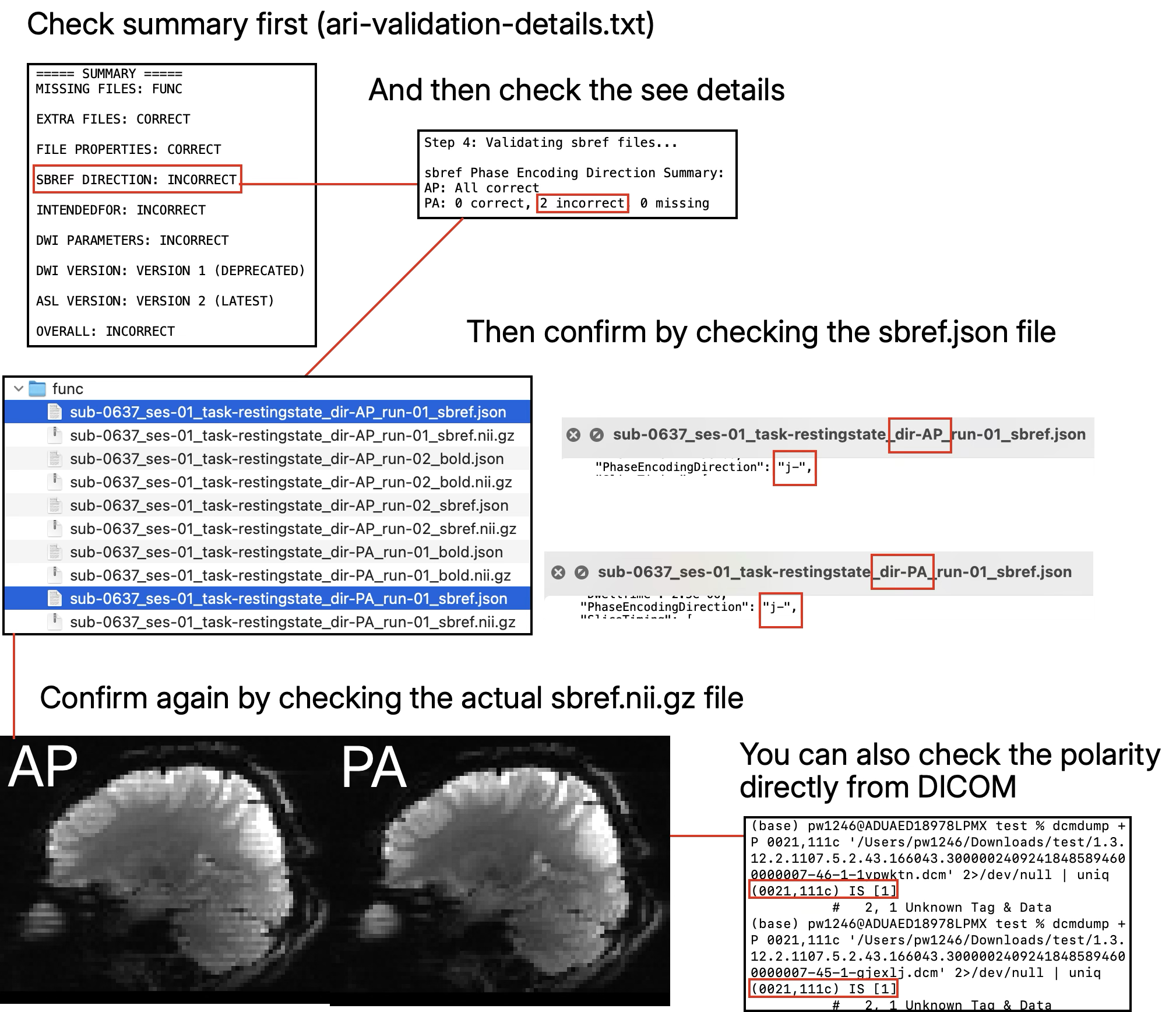
SBREF: Sometimes the phase encoding direction is flipped even though the AP/PA direction in the file name is correct. Review the affected files and coordinate with the project owner or XNAT administrators before removing anything. See example of incorrect SBREF
IntendedFor: Check the
IntendedForfield in theepi.jsonfile infmapand identify what is incorrect. First check for missing or extra files. If that is not the issue, contact us and we can help you take a look.DWI Parameters: Version 1 of the DWI protocol is deprecated due to mismatches in the DWI and reverse b0 parameters. If someone was not scanned under version 1 yet still has mismatching issues then you need to investigate further.
Incorrect dimensions and TR: Check if data is incomplete or if wrong sequence was used.
Missing files: Re-upload or transfer missing files to the correct location after confirming the intended session structure.
Extra files: Review extra files and remove only files that the project owner confirms are invalid or out of scope.
Multiple sessions: Scans collected in separate sessions may need to be consolidated for analysis. For example, if anatomical scans were skipped because they had already been collected before, coordinate with the project owner or administrators to copy the required anatomical files into the analysis session.
Repeated scans: If a scan was collected multiple times, decide which scan should be retained based on the acquisition notes and project quality-control criteria.
Validation Scope & Disclaimer
Note
We provide a simple validation check to ensure data compliance with basic BIDS standards, but it is ultimately the researcher’s responsibility to verify their own data in detail.
We do not check everything. Do not assume that data passing our check is perfect.
What we check: Basic properties of BIDS
rawdata(e.g.,anat,fmap,func,dwi,asl).What we do NOT check: Data currently outside the standard pipeline scope, such as abdomen scans, OCT scans, or behavioral data.
Custom Checks: If you have specific properties you wish to validate (e.g., checking for specific parameters), please inform us, and we can work on implementing those checks if suitable.
Choosing the Correct ARI Project
Over time, several ARI project folders have been created for active data collection, historical data, validation, and migration work. Most users should work only in the project folder assigned by the ARI project team.
Current ARI data
The current ARI project is the primary folder for end users.
New data should be validated before downstream preprocessing.
If a subject appears in more than one ARI-related project, confirm which project should be used before downloading or processing data.
Historical or migration projects
Some older folders may contain historical, migrated, or partially validated data.
Do not assume historical folders are ready for analysis.
Contact the project team or XNAT administrators if you are unsure which folder to use.
External collaborations
Collaborating sites may have separate ARI project folders.
Confirm access and data-use expectations with the project team before using external-site data.
Next Steps
Fix any validation errors identified
Proceed with preprocessing using fMRIPrep or TractoFlow
Learn about BIDS Format format requirements
See Download via Browser for accessing validated data