dcm2bids
The dcm2bids converts your DICOM data to BIDS format on XNAT. This is the essential first step that unlocks access to all modern analysis pipelines including MRIQC, fMRIPrep, TractoFlow, and others.
For comprehensive information about dcm2bids, visit the official documentation.
What You Need
DICOM data uploaded to your XNAT session
Project permissions to run pipelines
dcm2bids configuration file
How to Launch the Pipeline
Note
For step-by-step instructions on running any pipeline, see Running Pipelines on XNAT. To enable pipelines for your project, see Enabling Pipelines for Your Project.
Navigate to your session in XNAT, click “Run Pipeline”, select “dcm2bids”, and configure these parameters:
Subject Number (Optional): Leave this empty unless you want to use a different subject ID than the one derived from the DICOM. When left empty, the pipeline automatically extracts the subject number from the session label and zero-pads it to 4 digits (e.g.
0201→sub-0201).Warning
Do not enter a subject number here unless you specifically need to override it. If you do enter a value, XNAT strips any leading zeros before passing it to the pipeline — so entering
0201will producesub-201instead ofsub-0201. To preserve the correct zero-padded ID, simply leave this field empty.Session Number (Optional): Override automatic session numbering
Enable Pydeface (Default: True): Automatically deface anatomical images
Automatic Features: - SBRef processing and fieldmap associations are handled automatically - BIDS validation ensures compliant output
What You Get
BIDS-formatted data in your session’s Resources/rawdata/ directory:
Resources/rawdata/
  dataset_description.json
  participants.tsv
  sub-<subject>/ses-<session>/
    anat/ → T1w, T2w images + JSON metadata
    func/ → BOLD runs, SBRef images + JSON metadata
    fmap/ → Fieldmaps + JSON metadata (with IntendedFor configured)
For BIDS format details, see BIDS Format.
Configuration Files (Advanced)
The dcm2bids configuration file tells dcm2bids how to map your study’s DICOM series
into BIDS files. Because sequence names and scan protocols vary across projects, you
should create a config.json file tailored to your own study.
Upload the configuration file as a project-level resource:
Navigate to your project page in XNAT.
In the Actions panel, click Manage Files.
Under Resources, create a folder named
configsif it does not already exist.Upload your dcm2bids configuration file as
config.jsoninside that folder.
The expected project resource path is:
Resources/configs/config.json
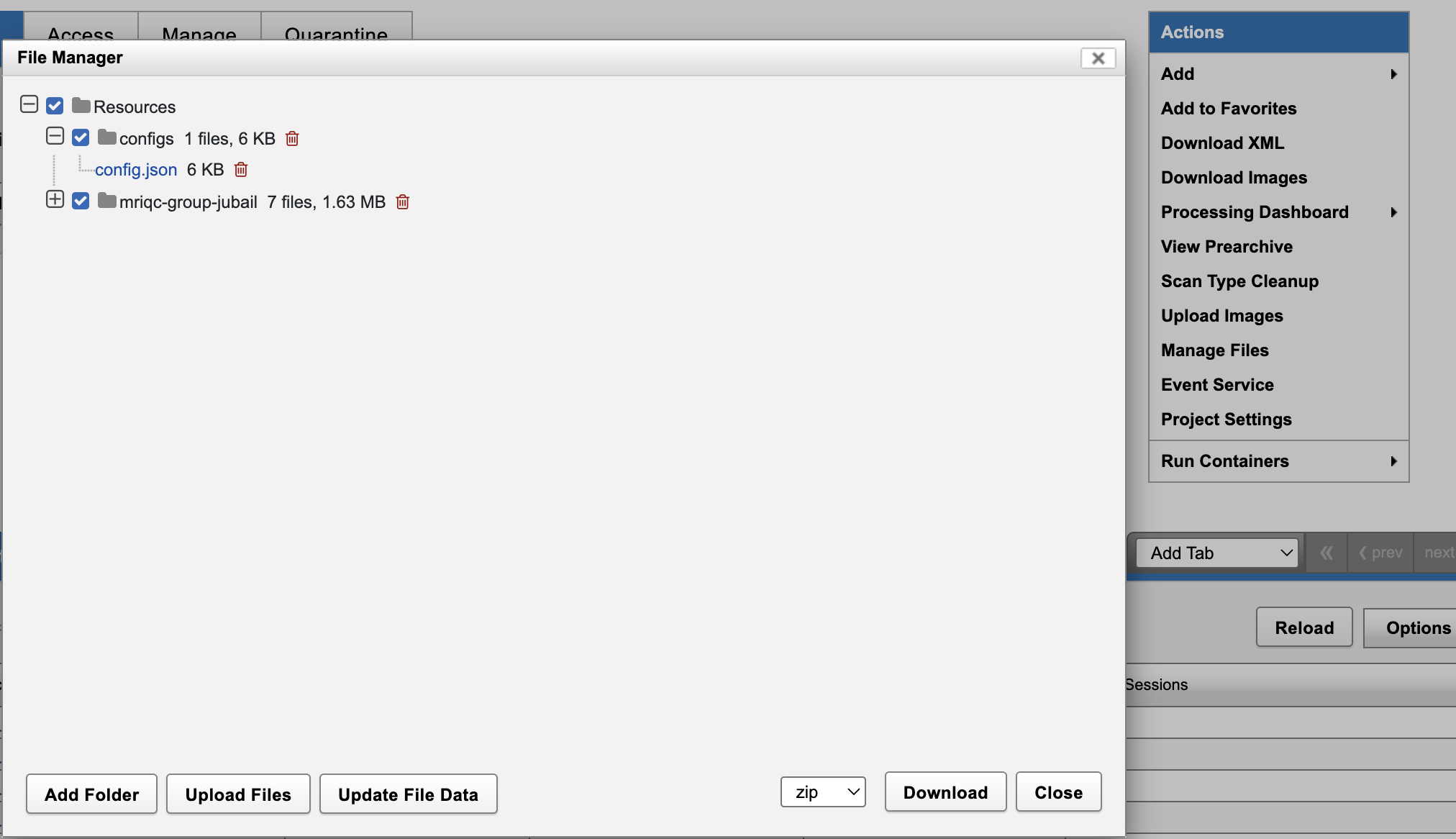
When the pipeline runs, it looks for this project-level config.json first. If it
cannot find a dcm2bids configuration file, it will try to use the default ARI
configuration maintained for NYUAD XNAT. That default is only a fallback. You should
always make your own configuration file for your study so sequence matching, task
labels, fieldmaps, SBRefs, and other BIDS metadata reflect your acquisition protocol.
For configuration file creation, see the dcm2bids configuration guide.
Common Issues
Non-Standard Sequence Names: Create custom configuration file for site-specific protocols
Missing Data: Ensure all required sequences (T1w, functional) were acquired
Privacy Settings: Disable pydeface if needed using pipeline parameters
Next Steps
Quality Control: Run MRIQC to assess data quality
Preprocessing: Use fMRIPrep for functional data processing
Data Access: Use Download via Browser to download converted data